
Cheapest School ERP Software with Lifetime Access — No Yearly or Hidden Charges
Most school ERP software works like a subscription you can never cancel — pay every year, per student, forever, or lose access to your own school's data and tools. On top of that, schools often end up paying separately for ID card design software, certificate templates, marksheet formatting tools, and photo editing tools, because the "ERP" only handles the administrative basics.
We built ours differently: one-time payment, lifetime access, no yearly renewal, and no external software needed — because everything a school actually uses day-to-day is already built in.
One-Time Payment, Lifetime Access — What That Actually Means
- No annual license renewal — pay once, use it every academic year going forward, with no recurring per-year cost
- No per-student pricing that grows every admission season — unlike ERPs that scale their fee with your enrollment numbers
- No external tools required — ID cards, certificates, marksheets, and graphics are designed inside the same platform, not outsourced to separate paid software
- No hidden module charges — every tool shown below is included, not sold back to you as a paid "add-on" later
This makes it, feature-for-feature, one of the most cost-effective school ERP systems available — because the total cost doesn't compound every year like subscription-based alternatives.
What's Included — 16 Built-In Tools, Explained in Detail
Enrollment & Records
Enrollment Studio This is where a student's journey into the system begins. Enrollment Studio handles new student registration, lets staff add and edit records as details change year to year, and keeps every student's information centralized instead of scattered across separate admission registers and Excel sheets. Because it's connected to the rest of the platform, a student enrolled here is immediately available for ID card generation, marks entry, and timetable assignment — no re-typing the same details into three different tools.
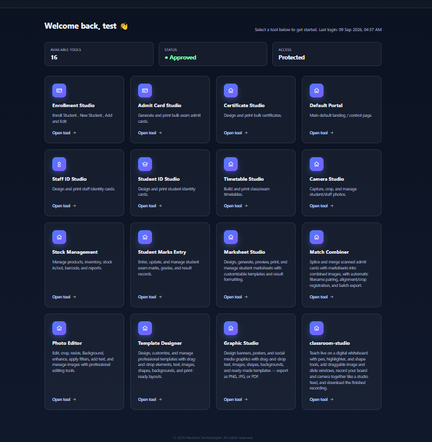
Default Portal The Default Portal is the main dashboard staff land on after logging in — a single control page showing available tools, account approval status, and access level at a glance. Instead of navigating a maze of menus, staff see exactly what they're authorized to use and can jump straight into the relevant studio.
ID Cards, Admit Cards & Certificates
Student ID Studio Design and print student identity cards directly from enrolled student data — photos, names, class, and section pull automatically instead of being manually placed on every card. This matters most during bulk ID card runs at the start of a term, where manual design work for hundreds of students would otherwise take days.
Staff ID Studio The same identity card design capability, built specifically for staff records — designations, departments, and staff photos formatted consistently across the whole institution, so staff ID cards don't end up looking like an afterthought compared to student cards.
Admit Card Studio Generates and prints bulk exam admit cards ahead of examination periods. Rather than formatting each student's admit card individually, this studio handles bulk generation directly from student and exam records, cutting what's traditionally one of the most tedious pre-exam administrative tasks down to a batch process.
Certificate Studio Design and print bulk certificates — academic achievement, sports, extracurricular participation, or course completion. Templates can be reused across events and years, so recognizing achievement doesn't mean starting a certificate design from scratch every single time.
Camera Studio A dedicated tool for capturing, cropping, and managing student and staff photos, feeding directly into ID cards and records elsewhere in the system. This solves a genuinely common pain point: inconsistent photo sizes and backgrounds from photos submitted by parents or taken on different devices, standardized here before they ever reach a printed ID card.
Academic & Exam Management
Timetable Studio Build and print class and exam timetables without juggling a spreadsheet grid manually for every section and subject combination. Timetables can be adjusted as schedules change and reprinted instantly, rather than redistributing hand-corrected paper schedules.
Student Marks Entry A structured interface for entering, updating, and managing student exam marks and grades. Because marks live in one connected system rather than separate teacher-maintained registers, cross-checking and correcting errors before report generation is significantly faster — and less error-prone than transcribing marks a second time onto a marksheet.
Marksheet Studio Once marks are entered, Marksheet Studio designs, generates, previews, and prints student marksheets using customizable templates and result formatting — including whatever grading structure your board or institution follows. Marksheets pull directly from the marks already entered, removing the manual transcription step that's historically where most marksheet errors happen.
Match Combiner A genuinely uncommon feature: Match Combiner splices and merges scanned admit cards with marksheets into single combined images, with automatic filename pairing, alignment and crop registration, and batch export. For schools that need to archive or distribute combined exam documentation — admit card and result together — this turns what would otherwise be manual image editing, one student at a time, into a batch operation. Most school ERP systems, even paid ones, don't offer anything like this.
Design & Media Tools
Photo Editor A full photo editing toolset — crop, resize, background adjustment, enhancement, filters, and text overlays. Useful well beyond ID cards: yearbook photos, event coverage images, and website/social media visuals can all be prepared without needing separate photo editing software or an external designer.
Template Designer Design and customize professional templates with drag-and-drop text, images, and shapes. This is the layer underneath several other studios — certificates, ID cards, and marksheets can all draw on templates built or customized here, so a school's visual identity (logo placement, color scheme, fonts) stays consistent across every printed document.
Graphic Studio Design banners, posters, and social media graphics with drag-and-drop tools, ready-made templates, and export to PNG, JPG, or PDF. For announcements, event promotion, admission season marketing, or social media presence, this removes the need for a separate graphic design tool or hiring outside design help for routine promotional material.
Operations & Live Teaching
Stock Management Manage products, inventory, stock in/out movement, barcoding, and inventory reports — covering everything from stationery and lab equipment to uniforms and library-adjacent supplies. Schools running any kind of physical inventory (a school store, lab consumables, sports equipment) get proper stock tracking without a separate inventory system.
classroom-studio A live digital whiteboard for teaching — pen and highlighter tools, shape drawing, draggable image and slide windows, and the ability to record the board and camera together as a combined session. Recordings can be downloaded afterward for students to review. This extends the platform beyond pure administration into actual teaching delivery, supporting hybrid or online classes, recorded lecture archives, or makeup sessions for absent students — without needing a separate video conferencing or whiteboard subscription.
Why This Setup Actually Saves Schools Money
Add up what most schools separately pay for across a year: an ERP subscription, ID card design/printing service, certificate design software, a marksheet formatting tool, and possibly a basic design tool for banners and notices. Each of those is normally a recurring cost on its own. Bundling all of it into one platform — with a one-time cost instead of five ongoing ones — is where the real savings come from, not just a lower sticker price on the ERP alone.
Role-Based Access, Built In
Access is controlled and protected by default — accounts are approved before use, and the dashboard clearly shows tool availability, approval status, and access level, so school administrators stay in control of who can use which tools.
Get Started
If you're comparing school ERP options and tired of recurring fees eating into your budget every renewal cycle, see what a one-time, lifetime-access system with this much built in actually looks like.
Talk to us on WhatsApp or explore more at researchzones.com to request a live demo of the dashboard.
Chat with our team directly on WhatsApp for a quick quote or free guidance.
Related on our site
Frequently Asked Questions
Is this really a one-time payment with no yearly renewal fee?
Yes — the license is a one-time payment for lifetime access. There's no annual renewal fee and no per-student recurring charge as your enrollment grows.
What tools are included in the lifetime license?
All 16 tools shown on the dashboard are included — Enrollment Studio, ID card and admit card studios, Certificate Studio, Timetable Studio, Camera Studio, Stock Management, Student Marks Entry, Marksheet Studio, Match Combiner, Photo Editor, Template Designer, Graphic Studio, and classroom-studio. None of these are sold separately as paid add-ons.
Do we still need separate software for ID cards, certificates, or marksheets?
No — ID card design, certificate design, and marksheet generation are all built into the platform, which is a core part of why this setup costs less overall than combining an ERP with separate design tools.
Does the software include a way to combine scanned admit cards and marksheets?
Yes — the Match Combiner tool splices and merges scanned documents into combined images automatically, with filename pairing and batch export, which is uncommon even in premium school ERP systems.
Is there a virtual classroom or online teaching feature?
Yes — classroom-studio provides a live digital whiteboard with drawing tools, draggable slides and images, and session recording, so it can also support online or hybrid teaching, not just administrative tasks.
How is this cheaper than other school ERP software in the market?
Most competitors charge annually, often per student, and require separate paid tools for ID cards, certificates, and design work. This system replaces all of that with a single one-time cost and lifetime access, which is significantly cheaper over multi-year use.
Related Articles
0 Comments
Be the first to comment.